The post HTTP vs HTTPS – Difference between HTTP and HTTPS appeared first on A2Z Gyaan.
]]>Recently if you have noticed HTTPS instead of HTTP and wondered what is wrong? Well then let me tell you that there is nothing wrong! It is completely safe and secure.
Let’s face it until recently the HTTPS was only used by certain ecommerce websites for their payment pages. But now most of the websites are using it. Why?

What is HTTP?
Well, HTTP stands for hypertext transfer protocol, and it is a protocol which allows communication between different systems. And this is one of the most widely used protocol for data transfer over the web but the data exchanged over here is not as secure as we all would like it to be.
Let us know why?
The main issue with the HTTP is that the data here is not encrypted which is a threat and it can be easily encrypted by the third parties to collect the data being passed between the two systems.
Now what exactly is HTTPS?
The issue of the HTTP is easily overcome in the HTTPS version, where the letter S stands for Secure. As this simply includes the SSL certificate which stands for Secure Sockets Layer which helps to create a very secure encrypted between the two of them the web server and the web browser.
HTTP vs HTTPS – Difference between HTTP and HTTPS
| HTTP | HTTPS |
| HTTP website is not secure especially for ecommerce which involves payments. | HTTPS is become very crucial for the websites which holds sensitive data such as ecommerce websites that involve payments and other important details of the users.
|
| HTTP data is not encrypted as such, so even the third party excluding the sender and the receiver can decode the data and easily understand it. | The benefit of the HTTPS is that if anyone even tries to open the message between the sender and the receiver won’t understand it as it will be encrypted. It could be decoded only by the receiver. And now this ensures complete safety.
|
| The HTTP uses the default port of 80. | Another difference between the two is that HTTPS uses the default port of 443.
|
| The HTTP is not encrypted and so it doesn’t require any processing time. | HTTPS it is encrypted however it requires a good amount of processing time as both the parties the web server and the web browser has to exchange the encryption keys using certificates before the actual data can be transferred ( this is to maintain complete security).
|
One must also know that the cryptographic protocols such as SSL or the TLS turns the http into https, to get this security level in the https version Public Key Infrastructure PKI is used by many web browsers, however the web server of that website can also use a private key.
The distribution of the key is simply done via certificates which are maintained by the browser. One can even check these certificates in their browser settings.
And now the veterans believe that without HTTPS if any data is passed it is insecure, this is one of the main reasons that you will notice many website’s address changing from http to https. Which is really not a big deal and even beneficial for you.
So if you are thinking too! Then you should probably go ahead and try to make your website more secure, however even https has its own limitations, it is not like that you use https and it guarantees you that your website won’t be hacked ever.
HTTPS is more of a necessity than giving any premium service to your viewers or customers. And if you are an ecommerce website then please get this done as soon as possible as according to a survey been conducted the customers immediately cancel the purchase if the website is not https.
Not only the visitors but even Google pays complete attention to your website’s security. And the companies which are even listed under the https have an edge over advantage of getting better ranks.
However the adaption to https is slow and the main reason is that there is lack of awareness among the people. People assume it to be too complex and we go with the spirit of why fix it if there is no problem as such?
Well this attitude is not good for long run; we must understand how important security is in this dynamic world of technology.
HTTPS offers the bare minimum security one would require however the decision if you should shift to https or not is a decision which is more driven by the Google’s algorithm.
Comment below if you have queries related to difference between http and https.
The post HTTP vs HTTPS – Difference between HTTP and HTTPS appeared first on A2Z Gyaan.
]]>The post Difference between LAN, MAN and WAN appeared first on A2Z Gyaan.
]]>Here you will learn about difference between LAN, MAN and WAN.
LAN
LAN stands for Local Area Network which ranges from small houses to small buildings. LAN works on different topologies such as Bus, star, ring, mesh, etc. In a small Organisation LAN is generally used as it provides many advantages such as high speed, reliable connections etc. LANs are easy to configure and operate as it includes less nodes or lesser number of computer systems connected to it. LAN is commonly called as Ethernet. It usually has 5-100 computers connected to it. LANs provides data transfer rates of upto 1gbps. LAN are generally used to share resources such as hardware devices like printers, scanners etc and commonly used for data transfer. LANs follow IEEE 802.3 standard. WLAN are also used where W stands for Wireless Connection which involves routers in place of modems. LAN enable stations to communicate directly using a common physical medium on a point to point basis without any intermediate switching node being required. Basic idea of LAN is to provide easy access of network resources and facilities between several interconnected systems.
Also Read: IPv4 vs IPv6 – Difference between IPv4 and IPv6
Various standards were developed for WLAN which are IEEE 802.11a, 11b, 11g and 11n. Most of the WiFi enabled devices today supports IEEE 802.11n standard.
LANs provides following properties to the user :-
1. Flexibility
2. Speed
3. Reliability
4. Adaptability
5. Security
MAN
MAN stands for Metropolitican Area Network which ranges from buildings to cities. MAN is simply a group of several LANs connected over a larger region covered by single LAN connection. Data rate is higher than LANs but less than WANs and covers more distance than LANs in geographical terms. A typical example of MAN is Local Cable TV network. It uses similar technology as LAN and follows IEEE 802.6 standards. These provide data transfer between 100-500 mbps which can be increased further with the help of using new technologies as these can also make use of fiber optic transmission technology between sites. The MAN standard is organised around a topology and technique called Distributed Queue Dual Bus (DQDB).
WAN
WAN stands for Wide Area Network which can range from countries to the whole world as well. The common term for WAN is internet. WAN consists of many LANs connected to cover large distances. Almost all the WANs uses store and forward subnets. WANs are the fastest networks and is mainly used for sharing of data over the network. Most WANs are telephone systems. WiMAX, GSM, CDMA, HSPA, LTE, fiber optics are some of the technologies supporting WAN. Covers distance upto 1000-10 kilo-meters. WANs can also use satellite or ground radio system.

Difference between LAN, MAN and WAN
|
Parameter
|
LAN
|
MAN
|
WAN
|
|
Area Covered
|
Covers small area i.e. within the buildings
|
Larger than LAN smaller than WAN
|
Covers large geographical areas
|
|
Error rates
|
Lowest
|
Moderate
|
Highest
|
|
Transmission speed
|
High
|
Moderate
|
High
|
|
Equipment cost
|
Uses inexpensive equipments
|
Uses moderately expensive eqipments
|
Uses very expensive eqipments
|
|
Standard
|
IEEE 802.3
|
IEEE 802.6
|
IEEE 802
|
|
Design and Maintenance
|
Easy
|
Moderate
|
Difficult
|
|
Transmission Media
|
Co-axial Cable
|
Co-axial and Fiber optic cables
|
PSTN or Satellite links
|
|
Uses
|
Used for time critical purpose.
|
Used for general purpose applications.
|
Used for non-time critical application.
|
Comment below if you have queries or found any information incorrect in about article for difference between lan, man and wan.
The post Difference between LAN, MAN and WAN appeared first on A2Z Gyaan.
]]>The post 13 Cool Uses of OTG Cable That You Probably Don’t Know appeared first on A2Z Gyaan.
]]>13 Cool Uses of OTG Cable That You Probably Don’t Know


The post 13 Cool Uses of OTG Cable That You Probably Don’t Know appeared first on A2Z Gyaan.
]]>The post IPv4 vs IPv6 – Difference between IPv4 and IPv6 appeared first on A2Z Gyaan.
]]>IPv4 stands for Internet Protocol version 4 and similarly IPv6 stands for Internet Protocol version 6. Internet Protocols are technologies which makes us connect our devices to web. IPv4 and IPv6 are the 4th and 6th revision of Internet Protocol technology.
IPv4 addresses are 32-bit length and it could support up to 2^32 IP addresses in total about 4.29 billion addresses. With growth of the Internet and devices it is estimated that the unused IPv4 addresses will eventually run out within some time.

There is inbuilt support of Internet Protocol Security (IPsec) in IPv6 whereas it is limited in IPv4. Apart from this fragmentation is done only by sender in IPv6 and incase of IPv4 it is done by both sender and forwarding routers.

IPv6 advances IPv4 with availability of Packet Flow Identification in IPv6 header in the Flow Label field which is absent in IPv4. Configuration of the IPv4 addresses are done either in Static (Manual) configuration OR Dynamic (DHCP) configuration mode. Auto-configuration of addresses are done in IPv6.
Multicast Group Membership is managed by Internet Group Management Protocol (IGMP) in IPv4 while it is done by Multicast Listener Discovery (MLD) messages in IPv6. Broadcast messages were present in IPv4 and absent in IPv6.
IPv4 vs IPv6 – Difference between IPv4 and IPv6
|
IPv4
|
IPv6
|
|
Introduced in 1981.
|
Introduced in 1999.
|
|
They are 32 bit addresses. They are represented in decimals.
|
They are 128 bit addresses. They are represented in hexadecimals.
|
|
Decimal Notation
Example: 192.168.10.1 |
Hexadecimal Notation
Example:2003:1CA7:0325:AB10:0321:7654:9810:DCAB
|
|
Header length is variable.
|
Header length is fixed.
|
|
In total, there could be about 4.29 billion addresses
|
In total, there could be about 3.4×10^38 addresses
|
|
Security features are optional.
|
Internet Protocol Security (IPsec) is inbuilt feature of IPv6.
|
|
Checksum field and Options fields are present in IPv4 header
|
Checksum field and Options fields are absent in IPv6 Header
|
|
Both Sender and Forwarding Routers perform Fragmentation.
|
Only the Sender performs Fragmentation.
|
|
IPv4 addresses are mapped to MAC Addresses using Address Resolution Protocol (ARP)
|
Here, Neighbor Discovery Protocol (NDP) is used instead of ARP.
|
|
Packet Flow Identification is absent.
|
Packet Flow Identification is present in the IPv6 header.
|
|
Configuration is done either in Manual (Static) or Dynamic (DHCP) mode.
|
Auto-Configuration of addresses are done.
|
|
Broadcast messages are present.
|
Broadcast messages are absent.
|
Thus, we conclude that IPv6 has many advancements over the previous generation IPv4 and should be replaced by it.
The post IPv4 vs IPv6 – Difference between IPv4 and IPv6 appeared first on A2Z Gyaan.
]]>The post Difference between USB 2.0 and 3.0 appeared first on A2Z Gyaan.
]]>USB 2.0 was introduced in April 2000 and it could provide up to 500 mA for power usage and could be used in charging of devices. It had 4 wires within the cable and had a high speed of 480Mbit/s. It had support for extensions and even for USB hubs which are very useful when handling multiple devices.

Now devices like smartphones, tablets, input/output devices could directly be connected to a computer and USB ports could charge up these devices thus replacing the requirement of power adapters and chargers.
With all these improvements, USB 2.0 still had issues like only one-way communication at one time (Polling mechanism), that is it could either send or receive data only one at one time. This made it quite inefficient of what it had to deliver to the user in spite being providing much more compared to its predecessor.
These issues were dealt when USB 3.0 was introduced and USB Implementers Forum (USB-IF) took control of the management of the company (USB 3.0 Promoter Group).
USB 3.0 now used two data paths which are unidirectional and received data from one and to send data using other simultaneously (Full Duplex). USB 2.0 could send or receive data only one at a time and not together (Half Duplex). This means USB 3.0 is more efficient than the previous versions in terms of data transfer.
USB 3.0 also holds up to 900 mA which means USB 3.0 devices provide more power when needed and conserve power when the device is connected but idling.
In USB 3.0, data transfer starts by the host making a request then getting a response from the other end which could be another device or storage like Flash Drives. Then the other end either accepts or rejects the request. If the request is accepted, data is sent or accepted from the host. If there is a lack of data or available space in the device then the device sends a Not Ready (NRDY) signal to the host that it is not able to process the request. Otherwise, it sends an Endpoint Ready (ERDY) to the host to reschedule the transaction. Therefore, we conclude that it lets a device asynchronously notify the host of its readiness.
USB 3.0 was launched with what is called as “SuperSpeed” transfer mode which has backward compatible plugs, meaning compatibility with USB 2.0. This meaning a USB 3.0 product could be used in a USB 2.0 port but will perform at the same level meaning its speed and power couldn’t be fully used.
However, USB 3.0 cables cannot be used with USB 2.0 and USB 1.1 peripherals.
Physically, USB 2.0 and USB 3.0 don’t have many differences in terms of appearance as USB 3.0 is backward compatible and can be used in 2.0 sockets. But sometimes the 3.0 connectors are colored blue to differentiate between the two.
USB 3.0 could also be comparatively more expensive than its predecessor because of technical advancement and being newer technology.
Difference between USB 2.0 and 3.0
|
USB 2.0
|
USB 3.0
|
|
|
1.
|
It was introduced on April 2000
|
It was introduced November 2008
|
|
2.
|
It consisted of 4 wires within the cable.
|
It consisted of 9 wires within the cable.
|
|
3.
|
It has a maximum signaling rate of 480 Mbit/s
|
It has a maximum signaling rate of 5 Gbit/s
|
|
4.
|
Can either send or receive at one time (Half Duplex).
|
Can send and receive data simultaneously (Full Duplex).
|
|
5.
|
Can draw up to 500mA power.
|
Can draw up to 900mA power with better power efficiency.
|
|
6.
|
A single cable without extension could be only 5m long.
|
A single cable without extension could be only 3m long.
|
|
7.
|
Referred as HighSpeed.
|
Referred as SuperSpeed.
|
|
8.
|
Usually black or gray colored.
|
Usually blue colored.
|
Thus, we conclude that 3.0 is a better choice when it comes to data transfer and even power transfer to devices.
Comment below if you found any information incorrect or missing in above article for difference between USB 2.0 and 3.0.
The post Difference between USB 2.0 and 3.0 appeared first on A2Z Gyaan.
]]>The post How to Convert Dual Audio Movie to Single Audio? appeared first on A2Z Gyaan.
]]>Few days back I thought to watch a dual audio movie (hindi + english) on my TV. When I inserted the USB in TV and played the movie then by default it was giving english audio. Actually I wanted to play it in hindi audio but there was no option in my TV to switch between audios. I searched on internet and found a simple way to convert the dual audio movie in single audio using a software named as Format Factory. Luckily that method worked and I was able to watch my movie. 
I thought to share the method so that others get benefited.
How to Convert Dual Audio Movie to Single Audio?
1. Go to below link to download Format Factor for free.
Download: http://www.pcfreetime.com/
2. Install the software and then open it. Now select the destination format in which you want to convert the video. Suppose you want to convert to MKV format, then select it. You can choose any other format that is supported by the device in which you want to play the video.

3. A new window will open, there click on Add File button to choose the video file.
4. Go to Output Setting and choose High quality and size option so that the quality of converted file should not decrease.

5. Click on Option button, this will open a window as shown in below image. There you will see all the available audio formats under Audio Stream option. Just choose the desired audio format and click on all OK buttons.

6. Click on Start button as shown in below image to start the conversion.

Finally you have your movie in desired audio format so go and enjoy it.
Comment below if you are facing any problem to convert dual audio movie to single audio.
The post How to Convert Dual Audio Movie to Single Audio? appeared first on A2Z Gyaan.
]]>The post 3 Ways to Recover Files from USB Pen Drive Infected by Shortcut Virus appeared first on A2Z Gyaan.
]]>Below I am sharing all those possible solutions for this problem.
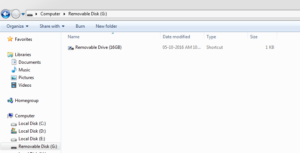
How to Recover Files from USB Pen Drive Infected by Shortcut Virus
Method 1:
It is one of the quickest methods to recover files.
Open your USB drive and type * in the search box at top right corner. This will display all the files present in the pen drive. You can also search for a particular file by its name. Now you can easily copy the files that you want.

Method 2:
1. Open Command Prompt and type following command.
attrib -h -r -s /s /d G:*.*
3. Now press enter to execute the command.

4. Open your usb drive, there you can see a folder without any name as shown in below image. It contains all the files.
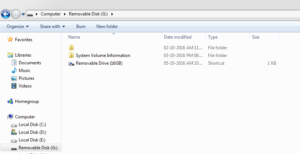
Method 3:
You can also use some data recovery software to recover your files. EaseUS data recovery software is best among all. You can download it from below link.
I hope this article helped you. Comment below if you are facing any problem.
The post 3 Ways to Recover Files from USB Pen Drive Infected by Shortcut Virus appeared first on A2Z Gyaan.
]]>The post Top 5 Best Smartphones Under 5000 in 2016 appeared first on A2Z Gyaan.
]]>
Top 5 Best Smartphones Under 5000 in 2015
Lava Iris Win1
Price: Rs. 4,999
SIM: Dual Sim, GSM + WCDMA, (Dual Standby)
Primary Camera: 5 Megapixel, Auto Focus, Flash
Secondary Camera: 0.3 Megapixel
Internet: Wifi, EDGE, GPRS, 3G
Sensors: Accelerometer, Ambient Light Sensor, Proximity Sensor
Display: WVGA, 480 x 800 Pixels, LCD, 4 Inches
Battery: Li-Ion, 1950 mAh
Expandable Memory: microSD, upto 32 GB
Ram: 1 GB
Internal: 8 GB, User Memory 4.74 GB
OS: Windows v8.1
Processor: 1.2 GHz + Qualcomm Snapdragon, Quad Core
Karbonn Titanium S2 Plus
Price: Rs. 4,890
SIM: Dual Sim, GSM + GSM
Primary Camera: 8 Megapixel, Auto Focus, Flash
Secondary Camera: Yes
Internet: Wifi, EDGE, GPRS, 3G
Sensors: Proximity Sensor, G-Sensor
Display: FWVGA, 480 x 854 Pixels, IPS, LCD, 5 Inches
Battery: 1900 mAh
Expandable Memory: microSD, upto 32 GB
Ram: 512 MB
Internal: 4 GB, User Memory 1.27 GB
OS: Android v4.4 (KitKat)
Processor: 1.3 GHz, Quad Core
Karbonn Titanium S4 Plus
Price: Rs. 4,887
SIM: Dual Sim, GSM + WCDMA
Primary Camera: 5 Megapixel, Flash
Secondary Camera: 2 Megapixel
Internet: Wifi, EDGE, GPRS, 3G
Sensors: Accelerometer, Proximity Sensor, Light Sensor, G-Sensor
Display: WVGA, 480 x 800 Pixels, IPS, LCD, 4 Inches
Battery: 1500 mAh
Expandable Memory: microSD, upto 32 GB
Ram: 1 GB
Internal: 4 GB, User Memory 1.73 GB
OS: Android v4.4.2 (KitKat)
Processor: 1.3 GHz, Quad Core
Micromax Unite A092
Price: Rs. 4,801
SIM: Dual Sim, GSM + GSM
Primary Camera: 5 Megapixel, Flash, HD Recording
Secondary Camera: 0.3 Megapixel
Internet: Wifi, GPRS, 3G
Sensors: G-Sensor, Proximity Sensor
Display: WVGA, 480 x 800 Pixels, IPS, 4 Inches
Battery: 1500 mAh
Expandable Memory: microSD, upto 32 GB
Ram: 1 GB
Internal: 8 GB
OS: Android v4.3 (Jelly Bean)
Processor: 1.2 GHz + MSM8212, Quad Core
Lenovo A680
Price: Rs. 4,902
SIM: Dual Sim, GSM + GSM
Primary Camera: 5 Megapixel
Secondary Camera: 0.3 Megapixel
Internet: Wifi, GPRS, EDGE, 3G
Sensors: Gravitation
Display: FWVGA, 854 x 480 Pixels, TN Screen, 5 Inches
Battery: 2000 mAh
Expandable Memory: microSD, upto 32 GB
Ram: 1 GB
Internal: 4 GB
OS: Android v4.2 (Jelly Bean)
Processor: 1.3 GHz + MT6582M, Quad Core
Also check the best android game – stickman soccer game
The post Top 5 Best Smartphones Under 5000 in 2016 appeared first on A2Z Gyaan.
]]>The post Automatically Detect & Install Missing Drivers in Windows appeared first on A2Z Gyaan.
]]>
As many more people faces the same problem so I thought that I should share this solution with you guys. So below I am sharing the step by step process by which you can automatically detect and install missing drivers in windows easily.
How to Automatically Detect & Install Missing Drivers in Windows Xp, Vista, 7, 8 and 8.1 (32 & 64 bit)
1. First of all download DriverEasy setup from below link and then install it.
https://www.drivereasy.com/
2. Now just run it and click on Scan Now button to start scanning for missing drivers.
3. DriverEasy scans your whole system and shows a list of all missing, outdated or mismatched drivers.
4. After that click on Get Drivers button as shown below.
5. Now download the drivers that you need. It will take few minutes depending on your internet speed. In case your downloading is failed due to some internet connection problem then don’t worry. The download process will resume from where it was stopped.
6. When downloading is finished, click on Install option to install the required drivers. Make sure to restart your system after finishing the installation process so that drivers get activated.
So this was the simple method to automatically detect and install the missing drivers on your pc or laptop. I am sure that there is no other method better than this. If still you know any other good way to do this then please mention it by commenting below. You can also ask your queries if you are facing any problem.
The post Automatically Detect & Install Missing Drivers in Windows appeared first on A2Z Gyaan.
]]>The post Wii error code 51330 – How to Fix Error 51330 appeared first on A2Z Gyaan.
]]>Sometimes this error occurs due to firewall setting, due to some settings you are stopping your system to access the internet . So lets get started.

How to fix wii error code 51330
Here we are describing different solutions to fix error code 51330
- Check your router for MAC filtering. If it is in enable mode than just put your systems MAC address inside the box. If you yet don’t find ,then simply disable MAC filtering option.
- Go to wii setting and check IP address and DNS settings manually.Try to write by urself rather than automatically.
- If you have made any changes in router security like WEB to WPA of WPA2 PSK , then simply check the same encryption settings to wii console online. Both should be same.
- Sometimes you enters the wrong security key for WPA or WEP . At that time you make sure that its correctly.
- At last,if above solutions doesn’t work out for you. Than just go to command prompt and write
IPCONFIG/ALL
EXIT
- Then unplug or restart your router to see weather it is fixed or not.
- Disable firewall option : Sometimes due to firewall settings you can’t access the internet in your system. So disable and try to connect internet.
- Set Default ip : Set your ip address to default if its changed by your internet provider
- Try to change your router’s broadcast channel from 1 or 11 and also change mode of browser G to Mixed.
- At last,try to update Firmware of your wifi router for latest configuration .
- Unplug your wifi router wait for some minutes and then start again and wait until it setups all and then start to access internet.
So these all are methods to solve wii error 51330. We hope that nintendo error code 51330 is solved now. If you still facing same issue than just comment here the difficulty. We will help you to solve.
The post Wii error code 51330 – How to Fix Error 51330 appeared first on A2Z Gyaan.
]]>